


My Cooking: Restaurant Game
4.75.21K Reviews
App Specs
- Version
- 11.2.23.5086
- Updated On
- License
- Free
- Downloads
- 50,000,000+
- Developer
- gameone
- Categories
- Arcade
- Platform
- Android, iOS
Screenshots
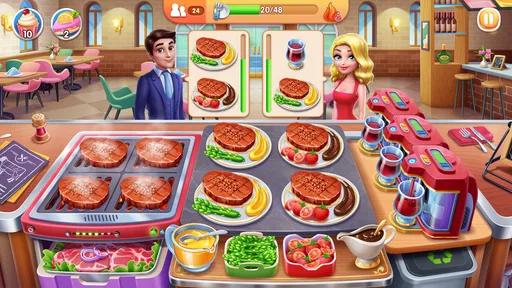
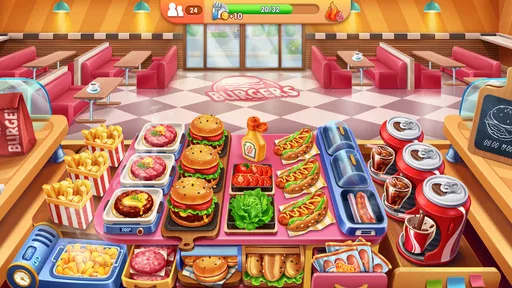

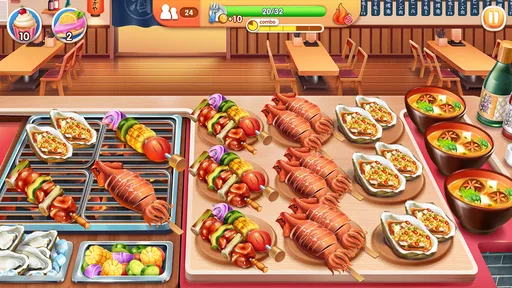

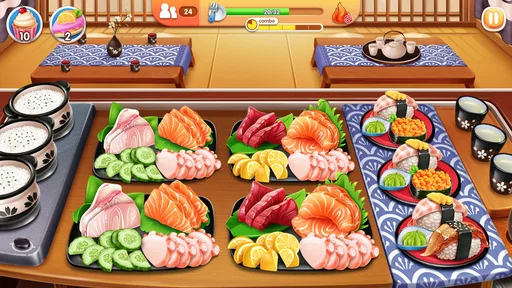

 Analysis by AppCompare
I like having a quick game on hand for the odd quiet moment, and My Cooking: Restaurant Game fits that role when I want something lively without settling in for a long session. It puts me in charge of a busy restaurant, where the fun comes from keeping orders moving and customers satisfied. It is an arcade game by gameone, and its appeal is easy to understand: the cooking theme is cheerful, while the pace asks me to make quick choices rather than simply watch things unfold.
A game to pass around at home
On a shared tablet or phone, this can be an easy game for different people to take turns with. One person can try a level, then hand the device to someone else, who gets an immediate feel for the goal: prepare the requested food and serve it before the queue becomes difficult to manage. That makes it more approachable for a casual family game night than a title built around long matches or complicated controls.
Taking turns works best when each player treats a level as a self-contained challenge. I would avoid passing the device in the middle of a busy round: someone else may inherit a screen full of orders without knowing what has already been prepared. A simple rhythm—one person plays a level, then the next takes a turn—keeps the handoff friendly and avoids turning a light game into a debate about who caused a customer to wait.
For a realistic everyday use, I can see someone opening it while waiting for dinner to finish or during a short break, then putting the phone away once the level is done. It is better suited to those brief bursts than to a household looking for a shared world everyone must check throughout the day. The game’s restaurant theme gives players a common point of interest, but the experience is still centered on the person holding the device.
Keeping play and purchases in perspective
Because a phone may be used by both adults and children, I would set expectations before handing it over. The game is free to download, but it offers in-app purchases, with items ranging from $0.49 to $99.99. That range makes it sensible for the person who manages the device to discuss purchases and any household app-store rules in advance. I would not assume that a child understands the difference between earning progress in a game and buying something with real money.
There is also a useful distinction between sharing a device and sharing progress. A family can take turns playing, but that does not mean each person has a separate game space or that one player’s choices are isolated from another’s. If keeping personal progress separate matters to you, treat the game as something to play in turns on the current device only if everyone is comfortable with that arrangement. For independent progress, separate devices and accounts are the clearer option, subject to the usual account and app-store settings.
For younger players, the Everyone age classification makes the game broadly suitable by content category, but that is not the same as a guarantee that every family will be comfortable with every purchase prompt or play habit. I would still stay nearby at first, explain that optional purchases cost money, and agree on when the device should be put away. Those are practical household boundaries, not special controls I would expect the game itself to provide.
Worth Reading Before You Choose

EA SPORTS FC Mobile 26 Is a Bigger Football Game, but It Takes Time

Flipboard Shows What News Apps Must Do Beyond the Feed

Switching to Android Auto Means Rethinking Your Driving Routine

Google Calendar Makes a Crowded Week Easier to Manage

Ludo King Makes the Most of the Minutes Between Plans

Baby Panda World Brings Quick Play to Modern Phones, but Its Game Library Feels Busy
Getting Started in the Kitchen
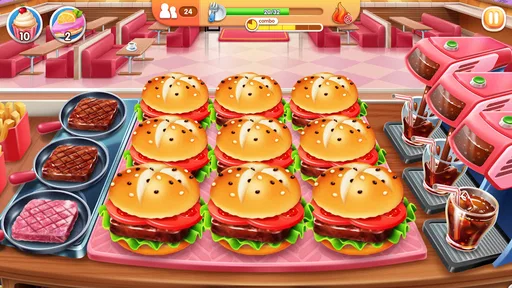
Once you fire up My Cooking: Restaurant Game, you’re greeted with a vibrant and colorful interface that instantly sets the mood for some culinary fun. The game kicks off with a quick tutorial that walks you through the basics. Trust me, it’s intuitive enough that even if you’re not a seasoned gamer, you’ll catch on quickly.
The premise is simple yet engaging—you manage a restaurant and strive to serve as many customers as possible. Your goal? To keep those customers happy by serving them their favorite dishes efficiently. The faster you are, the bigger the tip!
Cooking Up a Storm
The game offers a variety of cuisines to explore, from classic American burgers to exotic Asian delights. Each level presents new challenges and dishes, keeping the gameplay fresh and exciting. I love how each cuisine has its own unique set of challenges, making you feel like a true culinary globetrotter.
What I found particularly engaging is the way you can upgrade your kitchen equipment. As you progress, you earn coins and gems that you can use to spruce up your kitchen. Better equipment means faster service and happier customers—a win-win!
My practical tip is to think about upgrades as a response to a specific bottleneck, rather than spending just because an upgrade is available. When a round feels difficult, notice what is slowing you down: preparing dishes, keeping several orders straight, or serving customers quickly enough. Improving the equipment that addresses the pressure you actually feel is more useful than treating every upgrade as equally urgent. The trade-off is that progress can feel slower if you save resources, but you are less likely to spend them without a clear benefit.
The restaurant setup also makes it easy to understand why a level gets hectic: several customers can want different things while you are handling the cooking flow. I find that paying attention to the order queue before tapping quickly can prevent avoidable mistakes. Speed matters, but frantic tapping is not always the same as efficient play. A short pause to read what is needed can be worth more than rushing into the wrong action.
Graphics and Soundtrack
The graphics in My Cooking: Restaurant Game are nothing short of delightful. The vibrant colors and cute character designs add a layer of charm that makes the game visually appealing. The animations are smooth, and the attention to detail in the cooking process is impressive. It’s almost like you can smell the food cooking!
The soundtrack is upbeat and catchy, creating an atmosphere that keeps the energy levels high. It’s the kind of background music that stays in your head long after you’ve put the game down. A fun and immersive experience from start to finish.
That lively presentation is a good match for short play sessions, though it may not suit every setting. If I am playing near someone who is reading, working, or trying to rest, I would lower the device volume or mute it; the bright visuals and energetic music are part of the charm, but they can be a distraction in a quiet room. The game remains understandable as a visual task, so sound does not need to be the focus of every session.
Challenges and Rewards
One of the aspects I appreciate most about this game is its well-balanced challenge. Each level ramps up the difficulty just enough to keep you on your toes without feeling overwhelming. The key is all about strategy and timing—knowing which dish to prioritize and when to upgrade your equipment.
As you advance, the game rewards you with new recipes and ingredients, which adds an exciting layer of discovery. It’s a clever way to keep players engaged and motivated to push through the tougher levels.
For me, the strongest use case is a player who enjoys repeating a level to improve a run. The basic loop rewards attention and timing, so a small change in how I prioritize orders can make a round feel different without requiring a complicated control scheme. On the other hand, if you want a slow, open-ended cooking sandbox where you can experiment at your own pace, this is not the right fit: its restaurant-management challenge depends on keeping service moving.
Compared with many casual arcade games, the food-service theme gives each action an easy-to-follow purpose. A typical match or endless-runner alternative may focus on reflexes alone; here, I am also deciding what to handle first and how to manage a queue. That extra layer is satisfying when I want a little planning, but it can feel demanding if I only want a completely relaxed game with no pressure from waiting customers.
When a level becomes frustrating, I recommend stopping after a few attempts rather than spending resources impulsively to force progress. Returning later with a fresh eye can make the order sequence easier to read. This is especially helpful for younger or less experienced players: a level that feels hectic is not a sign that they have to buy their way forward, and taking a break is a perfectly reasonable choice.
In-App Purchases and Ads
Now, let’s talk about the inevitable—in-app purchases. While the game is free to play, there are options to buy coins and gems to speed up your progress. However, I found that with a bit of patience, you can enjoy the game without spending a dime. The ads are present but not intrusive, which is a refreshing change from many other mobile games.
The current version is 11.2.08.5086, and the game requires Android 7.0 or later. Its free entry point lowers the barrier to trying it, but I would still approach optional spending as a convenience rather than a requirement. If you are choosing a game for a household device, make the purchase boundary clear before the first session; if you are choosing for yourself, decide whether waiting for progress is acceptable before buying anything.
One question people often have is whether this is a good choice for someone who only plays occasionally. I think it can be, provided they enjoy returning to a level-based arcade loop and do not mind that improvement depends on practice and upgrades. Someone who dislikes repeated challenges or feels pressured by time-based service should look for a calmer cooking game instead. The same goes for players who want a realistic culinary simulator: the appeal here is quick restaurant action, not detailed recipe instruction.
Another consideration is how it fits alongside other games in the category. Compared with a puzzle game, it asks for faster reactions; compared with a pure reflex game, it gives those reactions a clear order-management context. That balance is its distinctive strength, but it also narrows its audience. I would recommend it to someone who enjoys juggling several small tasks, not to a player who finds multitasking stressful.
The game has a 4.7 average from around 417,000 ratings, with about 5,000 written reviews, and has passed 50 million installs. Those figures suggest that many players have tried it, but I would still judge it by whether its particular pace suits you. It is free, rated Everyone, and was released on December 5, 2019. That broad age rating can help when choosing a household game, while the purchase range and the busy play style are still worth considering personally.
Final Thoughts
In conclusion, My Cooking: Restaurant Game is a delightful blend of time management and cooking simulation that’s sure to entertain both casual gamers and food enthusiasts alike. Its engaging gameplay, charming graphics, and rewarding progression system make it a standout in the crowded mobile gaming market.
If you’re looking for a fun and addictive game that lets you live out your culinary dreams, give this app a try. Who knows? You might just discover your inner chef!
My household verdict is that it works best as an optional, take-turns arcade game for people who enjoy lively rounds and can agree on sensible device and spending boundaries. It is a weaker choice for anyone seeking separate household profiles, a quiet long-form experience, or a no-pressure cooking sandbox. I would try it when a short burst of restaurant chaos sounds fun, keep purchases deliberate, and switch to a slower alternative whenever the timer-driven pace stops feeling enjoyable.
Pros
- Engaging gameplay with diverse recipes.
- Colorful graphics enhance user experience.
- Frequent updates with new content.
- Easy to learn for all age groups.
- Offline mode available for play anywhere.
Cons
- Ads can be intrusive and frequent.
- In-app purchases can get expensive.
- Energy system limits play time.
- Some levels feel repetitive.
- Occasional bugs affect performance.
FAQs for My Cooking: Restaurant Game
What is the main objective of My Cooking: Restaurant Game?
In My Cooking: Restaurant Game, your primary goal is to manage and grow your restaurant empire by cooking a variety of dishes, serving customers efficiently, and upgrading your kitchen. The game challenges you to balance speed and strategy to achieve high scores, unlock new levels, and expand your culinary repertoire.
Do I need an internet connection to play My Cooking: Restaurant Game?
No, you can enjoy My Cooking: Restaurant Game offline. However, some features, such as updates, special events, and in-game purchases, may require an internet connection. Playing online also allows you to compete in leaderboards and participate in global challenges.
Are there any in-app purchases in My Cooking: Restaurant Game?
Yes, My Cooking: Restaurant Game offers in-app purchases. Players can buy various items such as gems, coins, and special power-ups to enhance gameplay and progress faster. While purchases can enhance your experience, they are optional, and you can still enjoy the game fully without spending money.
What types of cuisine are featured in My Cooking: Restaurant Game?
My Cooking: Restaurant Game features a diverse range of cuisines from around the world. Players can cook dishes from American, Italian, Chinese, and many other culinary traditions. As you progress, you unlock new recipes and ingredients, allowing you to explore and master different cooking styles.
How can I improve my cooking skills in the game?
To improve your cooking skills in My Cooking: Restaurant Game, focus on upgrading your kitchen equipment, learning new recipes, and efficiently managing time during gameplay. Completing daily challenges and participating in special events can also help you gain experience and unlock new skills and bonuses.


